
- 33% of organizations experienced data breaches caused by insiders in 2023.
- 60% of organizations reported that insider attacks are becoming more frequent.
- The average cost of an insider threat incident was $15.38 million in 2023.
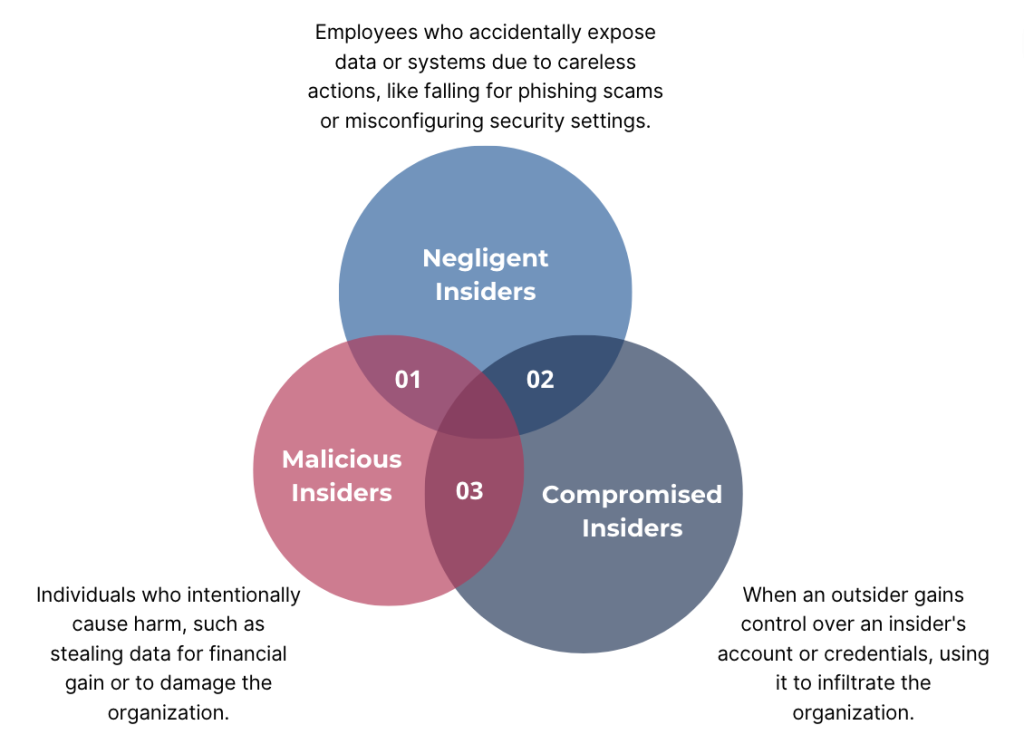
- Malicious insiders account for 23% of incidents, while negligent insiders cause 62%.
- 15% of incidents are caused by credential theft, where an outsider uses a compromised insider’s credentials.
- The financial services sector experiences the highest frequency of insider threats, with 47% of incidents reported in 2023.
- Organizations with an insider threat program report 64% fewer incidents and a 50% reduction in costs. (Cybersecurity Insiders)
- 74% of organizations reported an increase in insider threats since shifting to remote work environments during the COVID-19 pandemic.
- 50% of remote workers admitted to using unauthorized applications for work, increasing the risk of insider threats.
Why Understanding User Behaviour Matters
1. Identify User Needs: Regularly monitoring the usage of transaction codes and Fiori apps is crucial. This practice allows organizations to identify and remove those that are no longer needed, ensuring that the system remains streamlined and user-friendly.
2. Analyze Usage for Better Authorization Management: Many enterprises continue to use the authorizations initially designed during implementation. Over time, these can become burdensome and difficult to manage. Conducting a thorough usage analysis helps organizations understand what users are actually doing within the system. This insight is vital for initiating a cleanup or redesign project, allowing for a more efficient and manageable authorization structure.
3. Reduce Licensing Costs: By optimizing system usage and removing unnecessary transaction codes and apps, enterprises can significantly reduce licensing costs. This optimization ensures that resources are allocated efficiently, avoiding excess expenditure on unused or underutilized features.
4. Ensure Compliance: Maintaining a clean and well-structured system is essential for adhering to various compliance requirements. Regular usage analysis and system optimization help organizations stay aligned with regulatory standards, minimizing the risk of non-compliance.
How to analyze User Behaviour in SAP?
SAP by default captures the transaction profile for all the users. These reports can be utilized without any additional configuration.
The transaction profile capture and record data on user activities and transaction performance in SAP systems. This data includes information about transaction execution times, response times, user IDs, transaction codes, and other relevant metrics. By analyzing this data, organizations can gain a comprehensive view of how their SAP systems are being used and identify potential areas for improvement.
This report becomes input to various solutions for advanced analytics. However, the only limitation with this data is available in unorganized manner and it is not easy to understand. Extracting data from multiple areas, collating and presenting it in a readable format is a time consuming activity.
Using Advanced Analytics Tools:
Setting Baselines for Normal Behaviour
Understanding what’s “normal” for user behaviour is crucial for spotting anything out of the ordinary. By establishing baselines, we can detect when something unusual happens, such as:
-Accessing Unusual Transactions: If someone starts poking around in areas they usually don’t, it could be a red flag.
-Excessive Logins or Failed Attempts: A spike in login attempts might suggest someone is trying to break in.
-Unusual Data Exports: Large or frequent data exports can indicate potential data theft.
Regularly monitoring and auditing user activities are essential to catch suspicious behaviour early. Real-time monitoring lets us respond to threats as they arise, while audits provide a comprehensive view of user actions over time.
Machine learning and AI can take user behaviour analysis to the next level by automating the detection of complex patterns. These technologies can predict potential risks and fraud before they become real problems by analyzing past behaviour. Our advanced analytics also provide a greater insights on potential threats by analyzing the data time to time.


